
Building Kubernetes Cluster (v1.30) with kubeadm
Requirements
- 4 systems with at least 2GB of RAM
- 4 systems, each with at least 2 CPU cores
- All cluster nodes should have static IPv4 address assigned. If you're using DHCP, make sure DHCP always assigns the same IP to each node (DHCP binding). IPv4 addresses can be either from private address space (RFC 1918) or public address space.
- Each system should have unique hostname resolvable via DNS or /etc/hosts
- Each system should have unique MAC address
- Each system must have unique product_uuid (/sys/devices/virtual/dmi/id/product_uuid)
- Disable swap space on all nodes !!!
- Operating system: Ubuntu Server 22.04 LTS
Facts
| Node hostname | Node IP address | Node Role | Notes |
| k8s-master1.internal.lab | 192.168.40.40 | Master Node | Ubuntu 22.04 LTS |
| k8s-worker1.internal.lab | 192.168.40.43 | Worker Node | Ubuntu 22.04 LTS |
| k8s-worker2.internal.lab | 192.168.40.44 | Worker Node | Ubuntu 22.04 LTS |
| k8s-worker3.internal.lab | 192.168.40.45 | Worker Node | Ubuntu 22.04 LTS |
Kubernetes Cluster Architecture
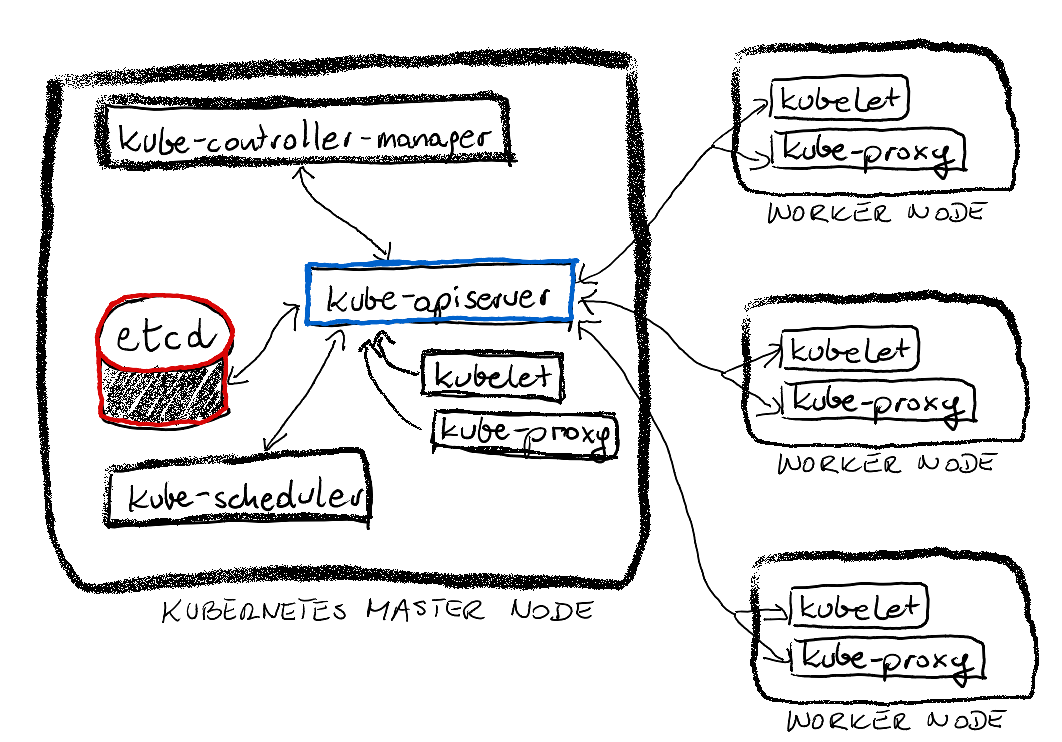
Section 1. Configure containerd runtime
All below steps in this section must be performed on master node and worker nodes with user root privileges.
Ensure overlay and br_netfilter kernel modules are loaded during system startup.
echo overlay > /etc/modules-load.d/containerd.conf
echo br_netfilter > /etc/modules-load.d/containerd.conf
Load the above modules manually.
modprobe -v br_netfilter
modprobe -v overlay
Enable routing on the system.
echo "net.bridge.bridge-nf-call-iptables = 1" > /etc/sysctl.d/99-kubernetes.conf
echo "net.bridge.bridge-nf-call-ip6tables = 1" >> /etc/sysctl.d/99-kubernetes.conf
echo "net.ipv4.ip_forward = 1" >> /etc/sysctl.d/99-kubernetes.conf
Apply sysctl settings.
sysctl --systemInstall containerd.
apt update
apt install -y containerd
Generate configuration for containerd.
mkdir /etc/containerd
containerd config default > /etc/containerd/config.toml
sed -i  's@SystemdCgroup = false@SystemdCgroup = true@' /etc/containerd/config.toml
systemctl restart containerd
Section 2: Connect system to Kubernetes APT/DNF repository
All below steps in this section must be performed on master node and worker nodes with user root privileges.
Connect Ubuntu system to Kubernetes APT repository.
apt update
apt install -y apt-transport-https ca-certificates curl gpg
mkdir -p -m 755 /etc/apt/keyrings
curl -fsSL https://pkgs.k8s.io/core:/stable:/v1.30/deb/Release.key | sudo gpg --dearmor -o /etc/apt/keyrings/kubernetes-apt-keyring.gpg
echo "deb [signed-by=/etc/apt/keyrings/kubernetes-apt-keyring.gpg] https://pkgs.k8s.io/core:/stable:/v1.30/deb/ /" > /etc/apt/sources.list.d/kubernetes.list
Install Kubernetes packages.
apt update
apt install -y kubelet kubeadm kubectl
Prevent Kubernetes packages from being accidentally upgraded or removed.
apt-mark hold kubelet kubeadm kubectlSection 3: Configure crictl
crictl tool provides functionality similar to Docker CLI, but is specifically designed to interact with CRI-compliant (CRI= Container Runtime Interface) runtimes.
crictl completion bash > /etc/bash_completion.d/crictl
crictl config --set runtime-endpoint=unix:///run/containerd/containerd.sock \
   --set image-endpoint=unix:///run/containerd/containerd.sock
Setting for crictl command are saved in /etc/crictl.yaml file.
Section 4: Initialize Kubernetes Cluster with kubeadm
All below steps in this section must be performed on master node.
Configure tab completion for kubeadm utility.
kubeadm completion bash > /etc/bash_completion.d/kubeadm
kubectl completion bash > /etc/bash_completion.d/kubectl
Log out, and log back in. This ensures that tab-completion is available for kubeadm and kubectl utilities.
As user root, run the following command to provision K8s cluster.
kubeadm init --pod-network-cidr=10.244.0.0/16At the end of this command, there will be some important information printed on a terminal. Note it down.
As regular user (or user root), configure Kubeconfig for kubectl utility. You can copy $HOME/.kube/config file to another machine in order to manage cluster from another client system.
mkdir -p $HOME/.kube
sudo cp /etc/kubernetes/admin.conf $HOME/.kube/config
sudo chown $(id -u):$(id -g) $HOME/.kube/config
Install network add-on (flannel) to complete provisioning Kubernetes cluster. Perform this step only on the master node.
kubectl apply -f https://github.com/flannel-io/flannel/releases/latest/download/kube-flannel.ymlWait few moments and allow some time for everything to start.
Section 5: Join Worker Nodes
Perform all steps from sections 1, 2, and 3, on all worker nodes. I wrote simple bash script with all the instructions.
- Save the script on each node as /root/prep-k8s-node.sh file.
- Make the script executable and run the script as user root.
Use previously saved kubeadm join command to join worker node to the cluster. Run kubeadm command as user root.
Section 6: Verify deployment
Display cluster nodes
kubectl get nodesNAME STATUS ROLES AGE VERSION
k8s-master1.internal.lab Ready control-plane 17m v1.30.2
k8s-worker1.internal.lab Ready <none> 13m v1.30.2
k8s-worker2.internal.lab Ready <none> 11m v1.30.2
k8s-worker3.internal.lab Ready <none> 11m v1.30.2Display pods from all namespaces
kubectl get pods --all-namespacesNAMESPACE NAME READY STATUS RESTARTS AGE
kube-flannel kube-flannel-ds-npf5s 1/1 Running 1 (8m2s ago) 16m
kube-flannel kube-flannel-ds-qq448 1/1 Running 1 (7m59s ago) 12m
kube-flannel kube-flannel-ds-tcsql 1/1 Running 1 (8m2s ago) 12m
kube-flannel kube-flannel-ds-z8z9g 1/1 Running 1 (7m57s ago) 14m
kube-system coredns-7db6d8ff4d-9tw5b 1/1 Running 1 (8m2s ago) 17m
kube-system coredns-7db6d8ff4d-xqj9t 1/1 Running 1 (8m2s ago) 17m
kube-system etcd-k8s-master1.internal.lab 1/1 Running 1 (8m2s ago) 17m
kube-system kube-apiserver-k8s-master1.internal.lab 1/1 Running 1 (8m2s ago) 17m
kube-system kube-controller-manager-k8s-master1.internal.lab 1/1 Running 1 (8m2s ago) 17m
kube-system kube-proxy-228zq 1/1 Running 1 (7m59s ago) 12m
kube-system kube-proxy-2sbqm 1/1 Running 1 (8m2s ago) 12m
kube-system kube-proxy-7mrpw 1/1 Running 1 (8m2s ago) 17m
kube-system kube-proxy-xcmfw 1/1 Running 1 (7m57s ago) 14m
kube-system kube-scheduler-k8s-master1.internal.lab 1/1 Running 1 (8m2s ago) 17mDisplay deployments from all namespaces
kubectl get deployments --all-namespacesNAMESPACE NAME READY UP-TO-DATE AVAILABLE AGE
kube-system coredns 2/2 2 2 18mDisplay services from all namespaces
kubectl get services --all-namespacesNAMESPACE NAME TYPE CLUSTER-IP EXTERNAL-IP PORT(S) AGE
default kubernetes ClusterIP 10.96.0.1 <none> 443/TCP 20m
kube-system kube-dns ClusterIP 10.96.0.10 <none> 53/UDP,53/TCP,9153/TCP 20m