
Benchmarking AI Models
Inference Engine Performance Comparison
Test Specification
- Prompt: Write 3 sentences about important historical facts in 20th century.
- Max Tokens: 500
- For each concurrency level, the same test is launched 5 times and average values are calculated. Pause for 10 seconds every iteration.
Hardware Setup
- Two NVIDIA RTX 5060 Ti 16GB
- AMD Ryzen 9 5950X 16-Core Processor
- PCIe gen4
- 128GB non-ECC RAM (2667 MT/s)
AI Model Setup
llama.cpp
Launching unsloth/gpt-oss-20b-GGUF:Q4_K_M.
docker container run --gpus all --rm \
        -p 9999:9999 \
        -v /opt/HuggingFace/mymodels/unsloth/gpt-oss-20b-gguf:/model \
        ghcr.io/ggml-org/llama.cpp:full-cuda12 --server -m  /model/gpt-oss-20b-Q4_K_M.gguf \
        --n-gpu-layers all \
        --tensor-split 1,1 \
        --flash-attn on \
        --host 0.0.0.0 \
        --port 9999
        -c 65536 \
        -b 2048 \
        -ub 512 \
        -np 100 \
        -cb \
        -kvu \
        --split-mode layer \
        --api-key "llama-myAPIKey" \
        --no-mmap \
        --cache-type-k q8_0 \
        --cache-type-v q8_0
Launching google/gemma-4-26B-A4B-it-qat-q4_0-gguf.
/root/llama.cpp/build/bin/llama-server \
        -hf google/gemma-4-26B-A4B-it-qat-q4_0-gguf \
        --alias "llama-gemma-4-26B-it-qat-q4_0" \
        --no-warmup \
        --host 0.0.0.0 \
        --port 9999 \
        --n-gpu-layers all \
        --tensor-split 1,1 \
        --flash-attn on \
        -c 262144 \
        -b 2048 \
        -ub 512 \
        -np 50 \
        -cb \
        -kvu \
        --split-mode layer \
        --api-key "llama-myAPIKey" \
        --device CUDA0,CUDA1 \
        --no-mmap \
        --cache-type-k q8_0 \
        --cache-type-v q8_0
vLLM
Launching openai/gpt-oss-20b
docker run --rm --gpus all \
        -v /opt/HuggingFace/mymodels/openai/gpt-oss-20b:/model \
        --env "OMP_NUM_THREADS=8" \
        --env "VLLM_CPU_OMP_THREADS_BIND=0-7" \
        --env "HF_HUB_OFFLINE=1" \
        -p 8000:8000 \
        --ipc=host \
        --name vllm-gpt-oss-20b \
        docker.io/vllm/vllm-openai:latest /model \
        --served-model-name gpt-oss-20b \
        --gpu-memory-utilization 0.8 \
        --max-model-len 65536 \
        --tensor-parallel-size 2 \
        --enable-prompt-tokens-details \
        --api-key vllm-myAPIKey \
        --kv_cache_dtype fp8
#       --enforce-eager
Launching gemma-4-26b-a4b-it
docker run --rm  --gpus all \
        -v /root/vLLM/HuggingFace:/root/.cache/huggingface \
        --env "HF_TOKEN=hf_yourAPIKey" \
        -p 8000:8000 \
        --ipc=host \
        docker.io/vllm/vllm-openai:latest \
        cyankiwi/gemma-4-26B-A4B-it-qat-AWQ-INT4 \
        --served-model-name gemma-4-26b-it-qat-awq-int4 \
        --gpu-memory-utilization 0.8 \
        --max-model-len 65536 \
        --enable-auto-tool-choice \
        --tool-call-parser gemma4 \
        --reasoning-parser gemma4  \
        --tensor-parallel-size 2 \
        --enable-prompt-tokens-details \
        --api-key vllm-myAPIKey \
        --kv_cache_dtype fp8 \
        --chat-template examples/tool_chat_template_gemma4.jinja
        #--enforce-eager
SGLANG
Launching openai/gpt-oss-20b
docker container run \
        --rm \
        -p 30000:30000 \
        --gpus all \
        --shm-size 32g \
        -v /opt/HuggingFace/mymodels/openai/gpt-oss-20b:/model \
        --ipc=host \
        --env HF_HUB_OFFLINE=1 \
        lmsysorg/sglang:v0.5.12-cu130 python3 \
        -m sglang.launch_server \
        --model-path  /model \
        --served-model-name gpt-oss-20b \
        --kv-cache-dtype fp8_e4m3 \
         --context-length 65536 \
        --host 0.0.0.0 \
        --port 30000 \
        --tensor-parallel-size 2 \
        --api-key sglang-myAPIKey \
        --mem-fraction-static 0.8 \
        --reasoning-parser gpt-oss
Ollama
[Unit]
Description=Ollama Service
After=network-online.target

[Service]
ExecStart=/opt/ollama/bin/ollama serve
Environment="OLLAMA_NUM_PARALLEL=10"
Environment="OLLAMA_MAX_LOADED_MODELS=2"
Environment="OLLAMA_HOST=0.0.0.0:11434"
Environment="OLLAMA_FLASH_ATTENTION=1"
Environment="OLLAMA_KV_CACHE_TYPE=q8_0"
Environment="CUDA_VISIBLE_DEVICES=0,1"
Environment="OLLAMA_SCHED_SPREAD=1"
Environment="OLLAMA_KEEP_ALIVE=-1"
Environment="OLLAMA_MODELS=/opt/ollama/Models"
Environment="HOME=/root"
Restart=always
RestartSec=10
Environment="PATH=$PATH"

[Install]
WantedBy=multi-user.target
Benchmark Results (gpt-oss:20b)
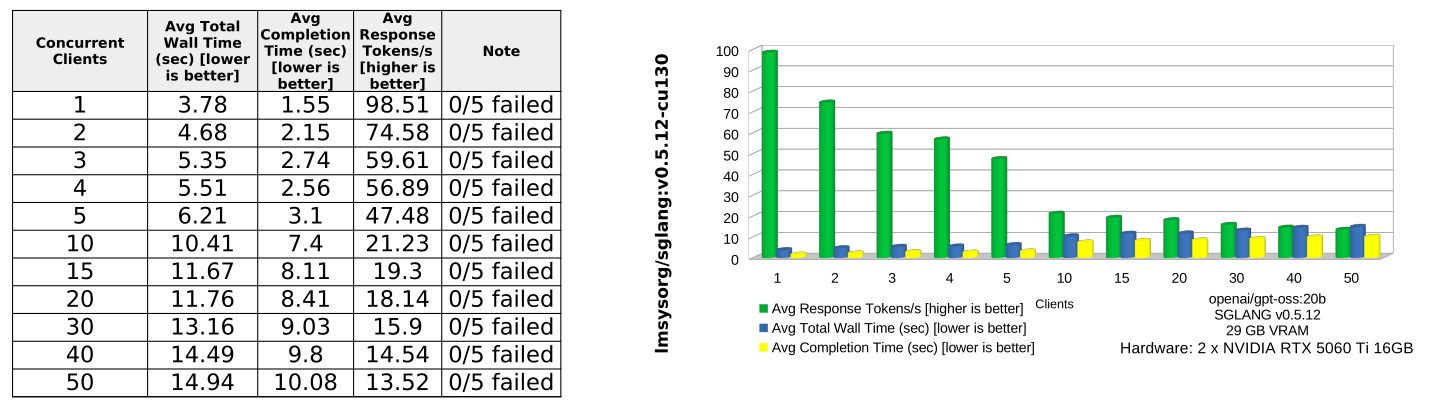
gpt-oss:20b Performance Summary
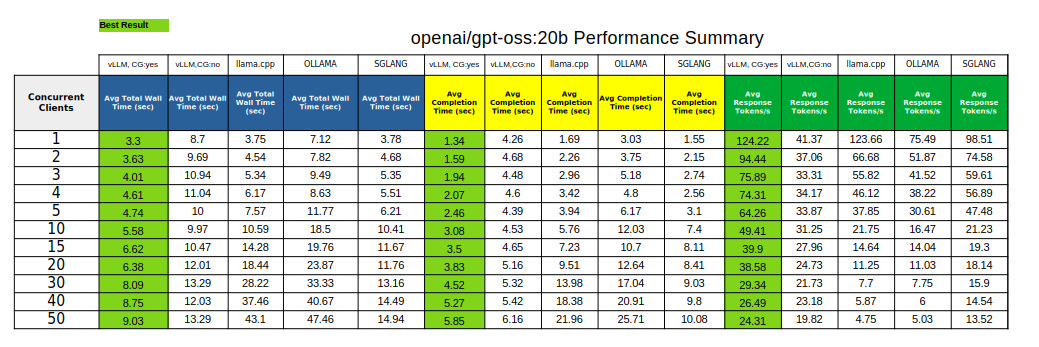
Summary of findings
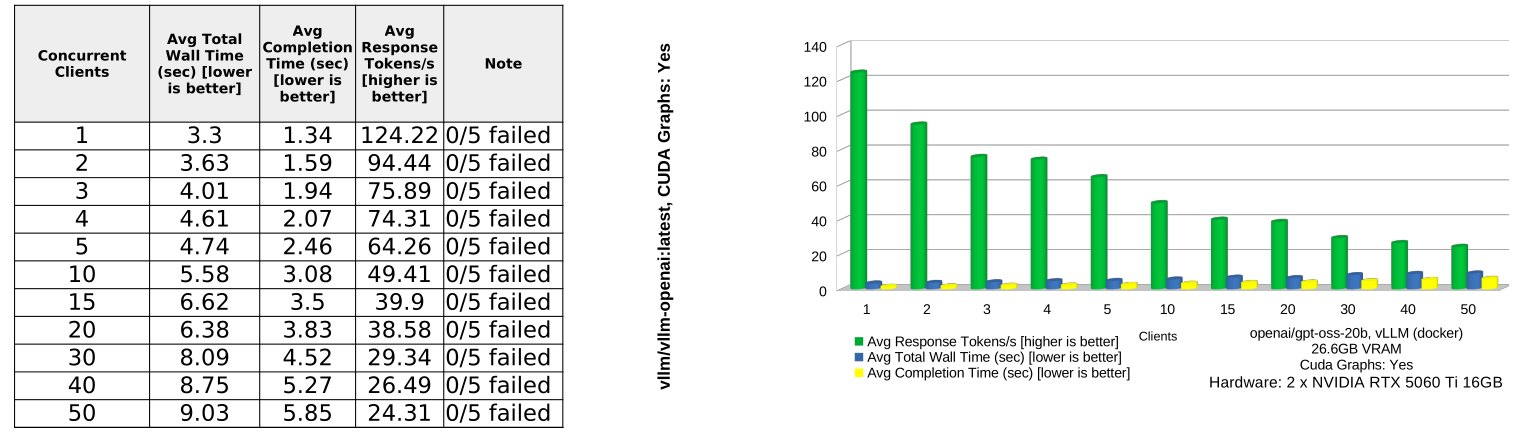
The clear winner is vLLM with CUDA Graphs enabled. It delivers the best result across every tested concurrency level for all three measured categories: avg total wall time, avg completion time, and avg response tokens/sec.
Overall ranking by average performance
| Engine | Avg Wall Time ↓ | Avg Completion Time ↓ | Avg Response Tokens/s ↑ | 50-Client Wall Time | 50-Client Tokens/s |
|---|---|---|---|---|---|
| vLLM, CG: yes | 5.89s | 3.22s | 58.29 | 9.03s | 24.31 |
| SGLANG | 9.27s | 5.90s | 39.97 | 14.94s | 13.52 |
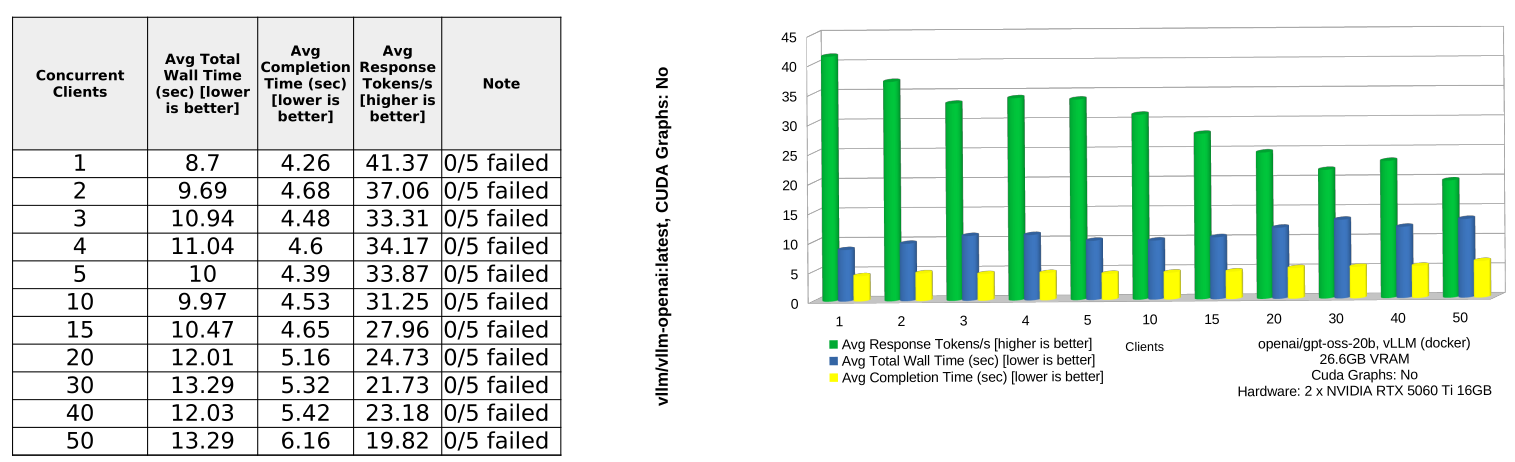
| vLLM, CG: no | 11.04s | 4.88s | 29.86 | 13.29s | 19.82 |
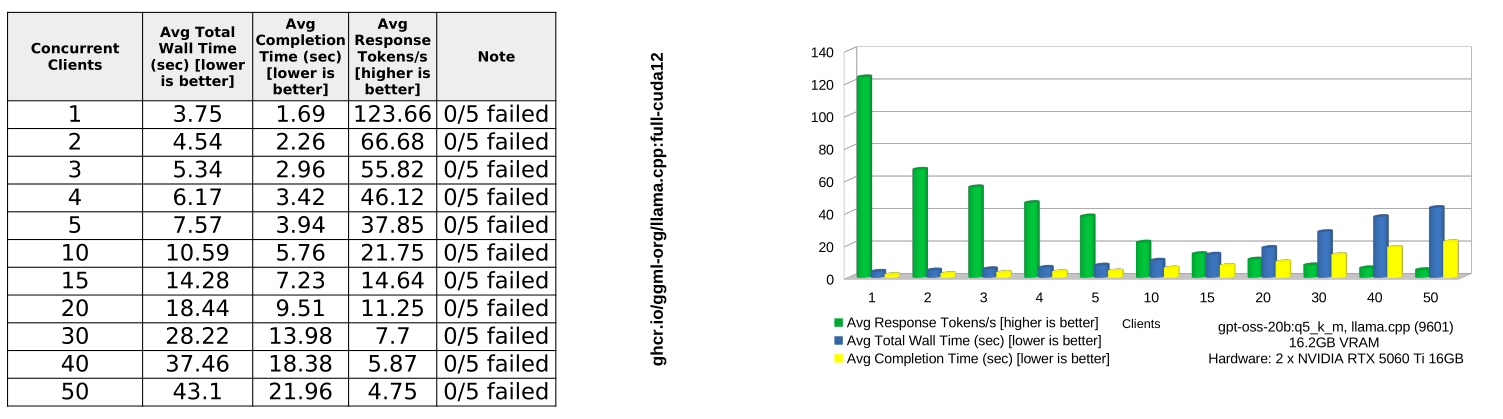
| llama.cpp | 16.31s | 8.28s | 36.01 | 43.10s | 4.75 |
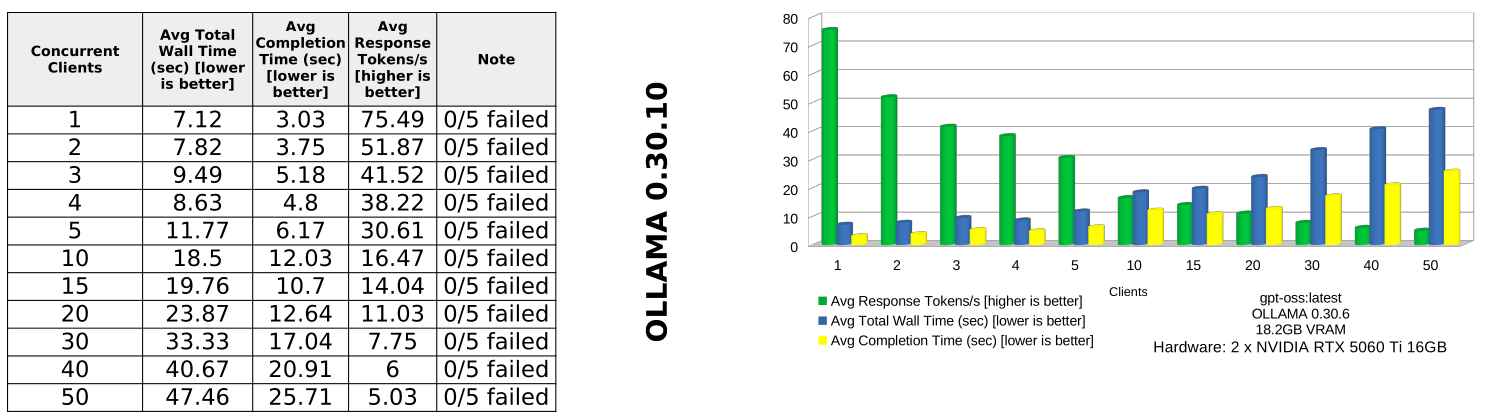
| OLLAMA | 20.77s | 11.09s | 27.09 | 47.46s | 5.03 |
Key takeaways
vLLM with CUDA Graphs enabled is the best production choice. It remains consistently fastest from 1 to 50 concurrent clients. At 50 clients, it completes requests in 9.03s wall time, compared with 13.29s for vLLM without CUDA Graphs, 14.94s for SGLANG, 43.10s for llama.cpp, and 47.46s for OLLAMA.
CUDA Graphs make a major difference for vLLM. Compared with vLLM without CUDA Graphs, enabling CG reduces average wall time from 11.04s to 5.89s and nearly doubles average response throughput from 29.86 to 58.29 tokens/s.
SGLANG is the strongest non-vLLM competitor overall. It performs well on wall time, especially at medium and high concurrency, and is generally much better than llama.cpp and OLLAMA under load. However, it still trails vLLM with CUDA Graphs across the board.
llama.cpp is competitive only at very low concurrency. At 1 client, llama.cpp is almost tied with vLLM CG:yes on response throughput: 123.66 vs 124.22 tokens/s. But it degrades sharply as concurrency increases, falling to 4.75 tokens/s at 50 clients.
OLLAMA is the weakest performer in this test. It has the highest average wall time and completion time, and its throughput drops heavily as concurrency increases. At 50 clients, it reaches only 5.03 tokens/s.
Recommendation
Use vLLM with CUDA Graphs enabled as the default inference backend for this workload. It provides the best latency, completion speed, and throughput, and it scales far better under concurrent load. Use SGLANG as the most credible alternative. Avoid llama.cpp and OLLAMA for high-concurrency serving unless there are deployment constraints that matter more than throughput and latency.
Benchmark Results (gemma-4-26b-qat)
Conclusions
gemma-4-26b-qat
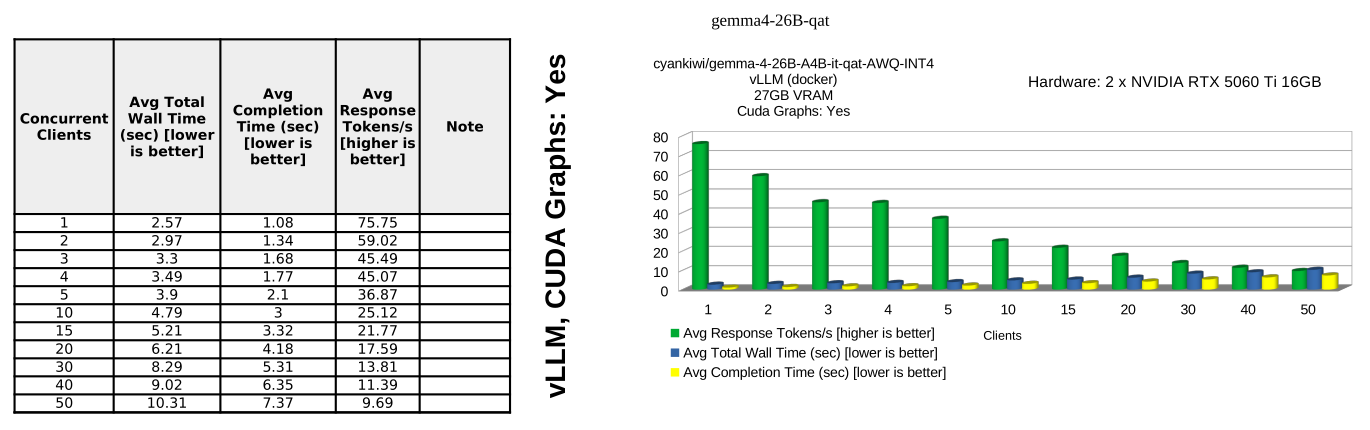
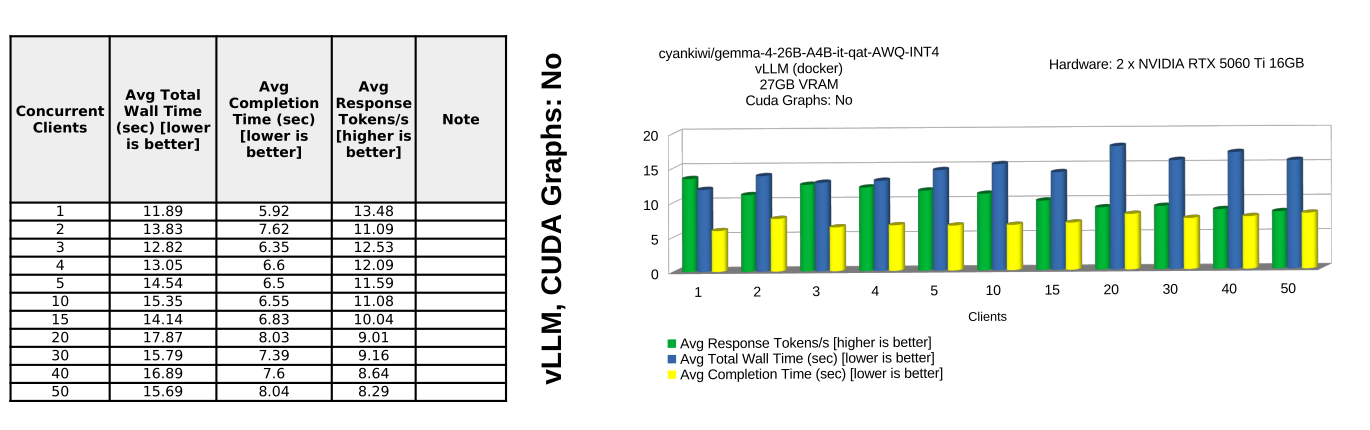
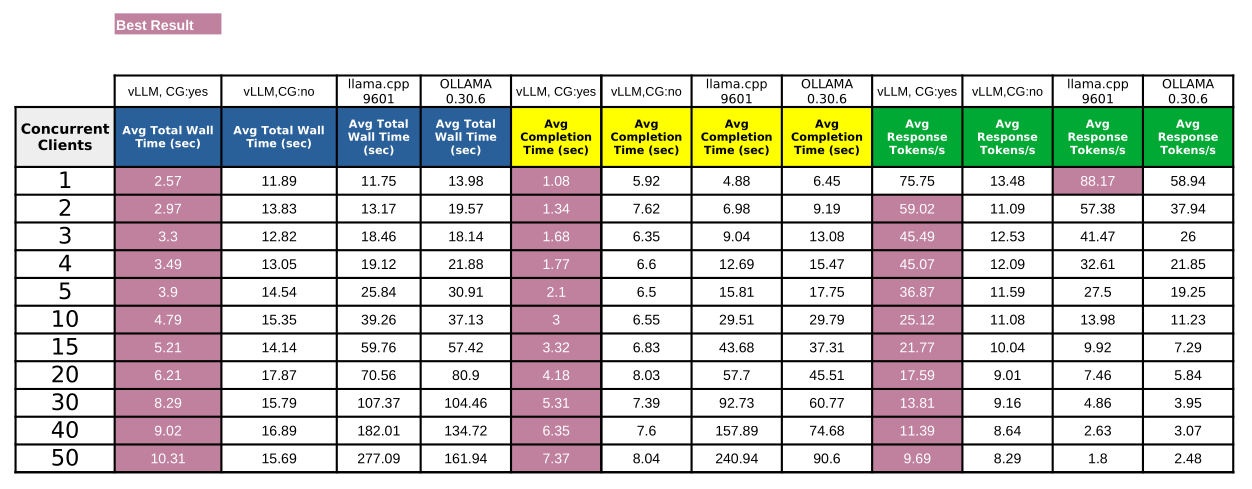
- vLLM inference engine is able to provide consistent high throughput and low latency output especially with CUDA graph buffers enabled.
- vLLM's peak response token per second isn't as high as with gpt-oss:20b; but still respectable avg 75.75 response tokens per second for single concurrent client.
- The major limiting factor in my setup is lack of sufficient CUDA cores and limited memory bandwidth of RTX 5060 Ti GPU.
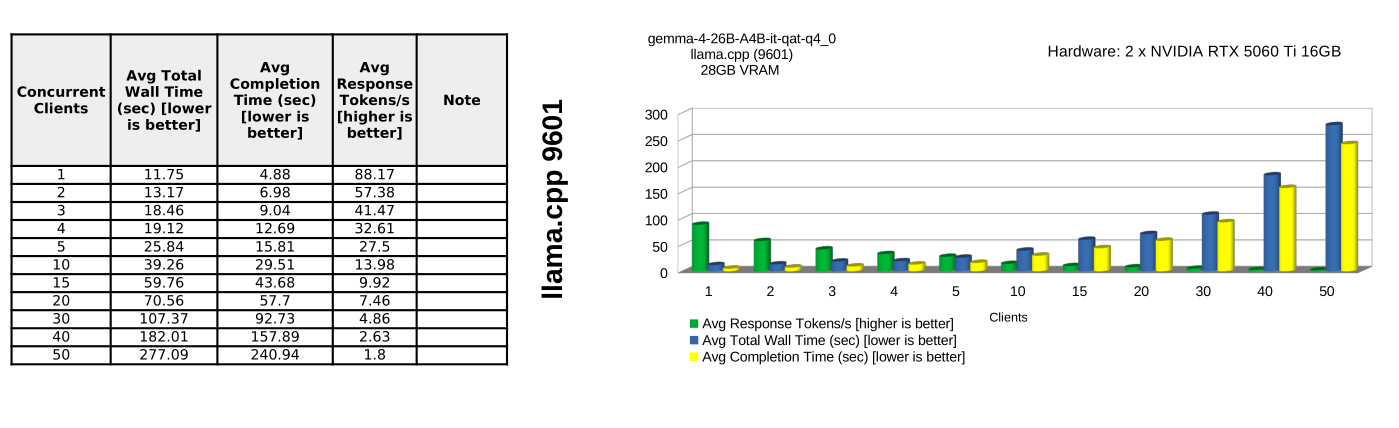
- Like in the previous test, llama.cpp is able to provide fairly decent performance for up to 3-5 concurrent clients.
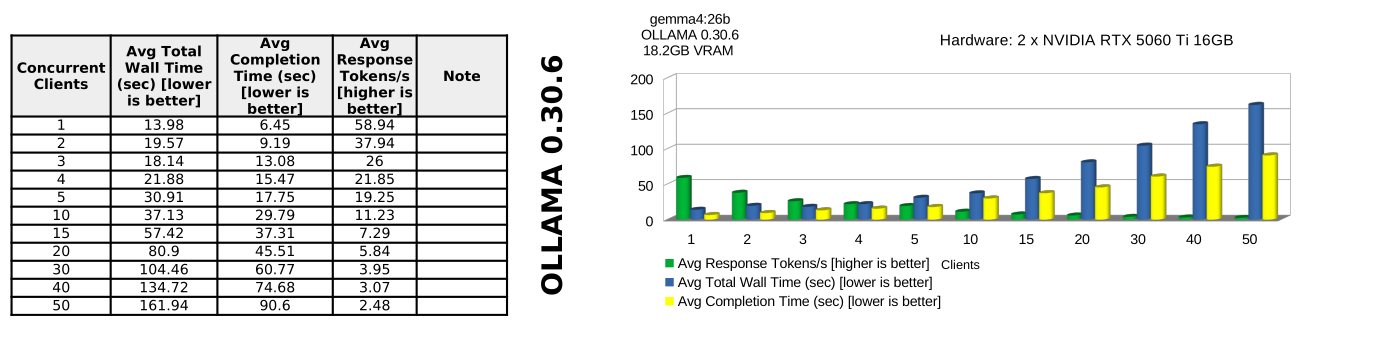
- ollama is the worst performer only really suitable for single client deployment; and even with just single client, ollama peaks at avg 58.94 response tokens per second.
Winner: vLLM