
UPS in Linux with apcupsd
apcupsd - a daemon for controlling most APC UPSes
Facts
| Configuration file | /etc/apcupsd/apcupsd.conf |
| Systemd service name | acpsupd |
Control system shutdown criteria
With the configuration parameters below:
- UPS is queried every 15 seconds (POLLTIME 15)
- If UPS battery charge level reaches 5% or less, apcupsd daemon will initiate system shutdown (BATTERYLEVEL 5)
- if UPS battery runtime is 5 or less minutes (MINUTES 5), apcupsd daemon will initiate system shutdown
POLLTIME 15
BATTERYLEVEL 10
MINUTES 5
Monitor UPS via SNMPv1
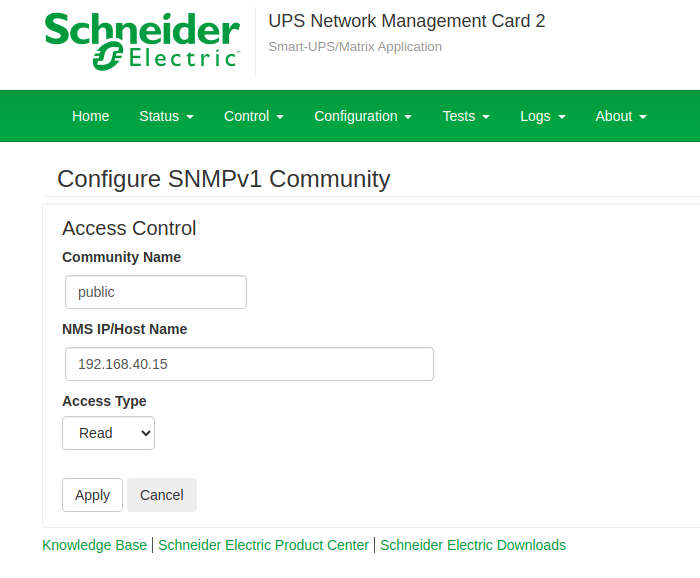
On APC UPS you're using UPS Management Card (like AP9630, AP9640, etc.), and you configured SNMPv1 read access for SNMP community named public, with SNMP daemon (on APC management card) listening on port 161/udp.
UPSCABLE ether
UPSTYPE snmp
DEVICE  192.168.40.2:161:APC:public
On UPS Management card you need to explicitly allow client's IP address to query SNMP information.
Monitor UPS via USB cable
Does not require UPS Management card.
UPSTYPE usb
UPSCABLE usb
DEVICE
Monitor UPS via PCNet (PowerChute Network)
Requires UPS Management card.
UPSTYPE pcnet     192.168.40.2:myuser:mypassword:3052
UPSCABLE smart
Replace myuser and mypassword with username and password configured on APC management card. User account type on management card must be either Read-Only, Device, or Administrator. Since apcupsd only needs to read information from UPS, designate user as Read-Only.
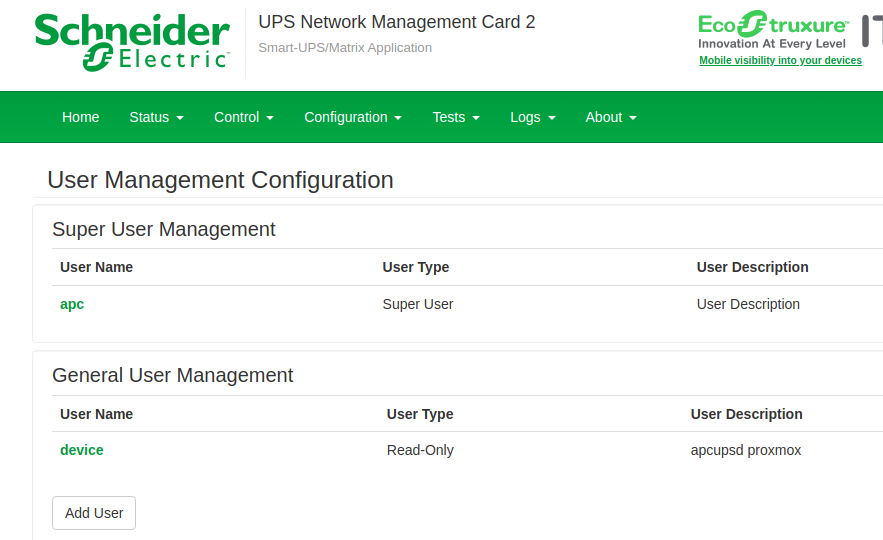
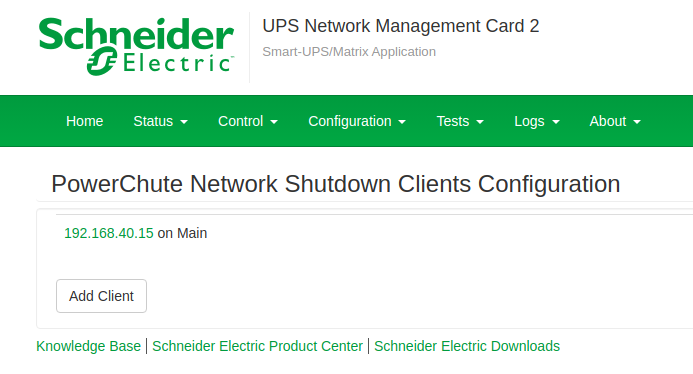
You must also specify PowerChute client IP address to allow host running apcupsd to communicate with management card. In the screenshot below, the 192.168.40.15 is the IPv4 address of the host running apcupsd.
After editing /etc/apcupsd/apcupsd.conf file, restart apcupsd service.
systemctl restart apcupsdVerify Connectivity with UPS
Run apcaccess command as user root.
apcaccessThis is sample out from the the above command.
APC      : 001,043,1004
DATE     : 2024-04-04 10:36:39 +0000
HOSTNAME : sirius
VERSION  : 3.14.14 (31 May 2016) debian
UPSNAME  : APCUPS
CABLE    : Ethernet Link
DRIVER   : SNMP UPS Driver
UPSMODE  : Stand Alone
STARTTIME: 2024-03-29 07:58:35 +0000
SHARE    : ShareUPS
MODEL    : Smart-UPS 750
STATUS   : ONLINE
LINEV    : 233.0 Volts
LOADPCT  : 59.0 Percent
BCHARGE  : 100.0 Percent
TIMELEFT : 13.0 Minutes
MBATTCHG : 10 Percent
MINTIMEL : 5 Minutes
MAXTIME  : 0 Seconds
MAXLINEV : 233.0 Volts
MINLINEV : 233.0 Volts
OUTPUTV  : 233.0 Volts
SENSE    : High
DLOWBATT : 7 Minutes
LOTRANS  : 208.0 Volts
HITRANS  : 253.0 Volts
ITEMP    : 37.0 C
ALARMDEL : No alarm
BATTV    : 27.0 Volts
LINEFREQ : 50.0 Hz
LASTXFER : Automatic or explicit self test
NUMXFERS : 0
TONBATT  : 0 Seconds
CUMONBATT: 0 Seconds
XOFFBATT : N/A
SELFTEST : OK
STESTI   : OFF
STATFLAG : 0x05000008
MANDATE  : 11/12/2012
SERIALNO : AS12XXXXXXX
BATTDATE : 11/15/2023
NOMOUTV  : 240 Volts
FIRMWARE : UPS 08.3 (ID18)
END APC  : 2024-04-04 10:36:48 +0000