
Full Text Search in NextCloud
NextCloud - Enable fulltextsearch in UI
Fixing issue where (for some unknown reason) NC got reconfigured itself to this:
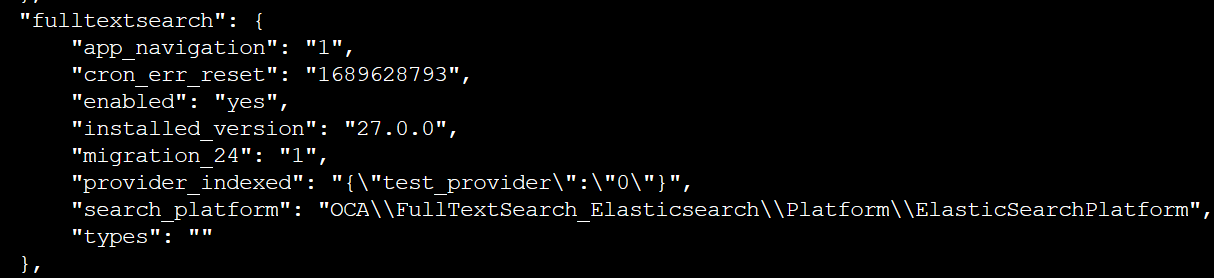
cd /var/www/html/nextcloud
sudo --user apache php occ fulltextsearch:configure '{   "provider_indexed": "{\"files\":\"1\"}"     }'
index.highlight.max_analyzed_offset
This setting determines the maximum character offsets that Elasticsearch is willing to analyse for highlighting purposes. Increasing this parameter allows Elasticsearch to process larger texts. However, be cautious as setting this too high might impact the performance of your Elasticsearch cluster, especially if you frequently have very large texts to process.
My current ElasticSearch configuration in Nextcloud:
- Address of the Servlet: http://172.22.30.12:9200/
- Name of your index: ncfiles
- Analyzer tokenizer: standard
Run this curl command against elasticsearch instance.
curl -X PUT "http://172.22.30.12:9200/ncfiles/_settings" -H 'Content-Type: application/json' -d'
{
  "index" : {
    "highlight.max_analyzed_offset": 80000000
  }
}'
Verify the settings
curl -X GET "http://172.22.30.12:9200/ncfiles/_settings?pretty"{
"ncfiles" : {
"settings" : {
"index" : {
"highlight" : {
"max_analyzed_offset" : "80000000"
},
"routing" : {
"allocation" : {
"include" : {
"_tier_preference" : "data_content"
}
}
},
"number_of_shards" : "1",
"provided_name" : "ncfiles",
"creation_date" : "1713946900042",
"number_of_replicas" : "1",
"uuid" : "-kH0SWHZR-mzjCGbPVSc-Q",
"version" : {
"created" : "7171099"
}
}
}
}
}